
Having a Google Business Profile (formerly called Google My Business) is one of the most important steps you can take as a real estate agent as it pertains to marketing your business and is the most important first step connected to getting ready to use the power of Google Local Service Adverts.
You want people to find your business when your target customers search for your services and products on a search engine like Google, don’t you? So if someone asks Google for “real estate offices near me,” or “real estate agents near me,” this is the local SEO (Search Engine Optimization) that will show up.
We’ll go into more reasons why you need a Google Business Profile (GBP) below, but we wanted to start off by asking if you’ve ever Googled yourself? If you haven’t, take a minute right now and click here: Google myself, and then come back (also take this step if you haven’t Googled yourself in a while too). What populated in your search? Whatever is showing happens to also be the online marketing that Google is displaying about you. Now, let’s review why having a GBP is so crucial, as well as some of the basic, but important, intentional steps you can take to get more SEO out of it.
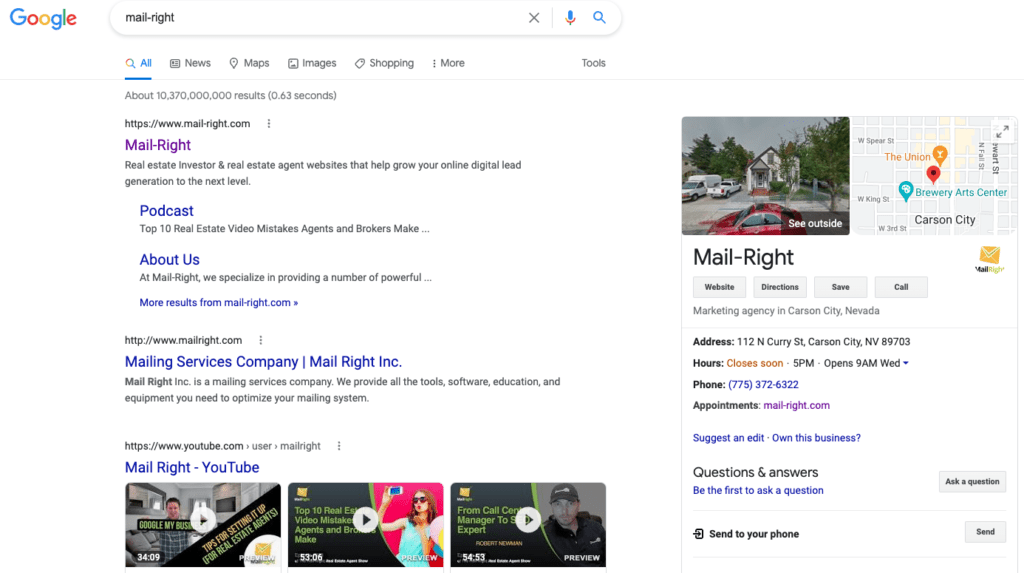
This is an online listing for your business specifically on Google. Although there is a free version everyone should take advantage of, you should also consider utilizing the optional paid ads through Google that we’ll briefly go into later.
Google is the largest search engine in the world…need we say more? In addition, you want a GBP because you want to grow your business online, reach more people and get more leads…right? Another reason is that if, or when, people Google you (or your business), they’re more than likely going to see what you just saw when you searched for yourself. This might be a positive or negative experience depending, so you might as well control what is seen by what you develop with your GBP listing for your company.
It doesn’t cost anything (except for some time and knowledge) to get it set up and to use their basic services. However, there are options within a GBP that do cost extra if you’d like to, but it’s not required.
As we mentioned, you can create your own listing either by yourself, or you can have a company like Mail-Right set it up for you (it’s also included with all of our plans because we understand how powerful this is for you and your business). There are some nuances and details when setting up your listing that you’ll want to consider and take advantage of, so if you’re not familiar with the local SEO, utilizing keywords and what ranks best in your industry and area, you should probably have someone like us create it for you so you can maximize the results vs. hoping you set it up correctly. However, don’t be afraid to try to create it on your own too…it’s all about ROI (your return on investment) and your availability.
Step 1:
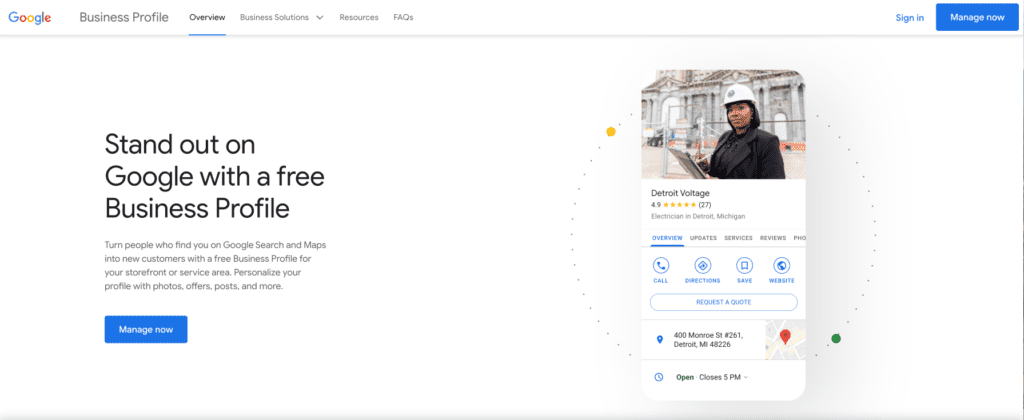
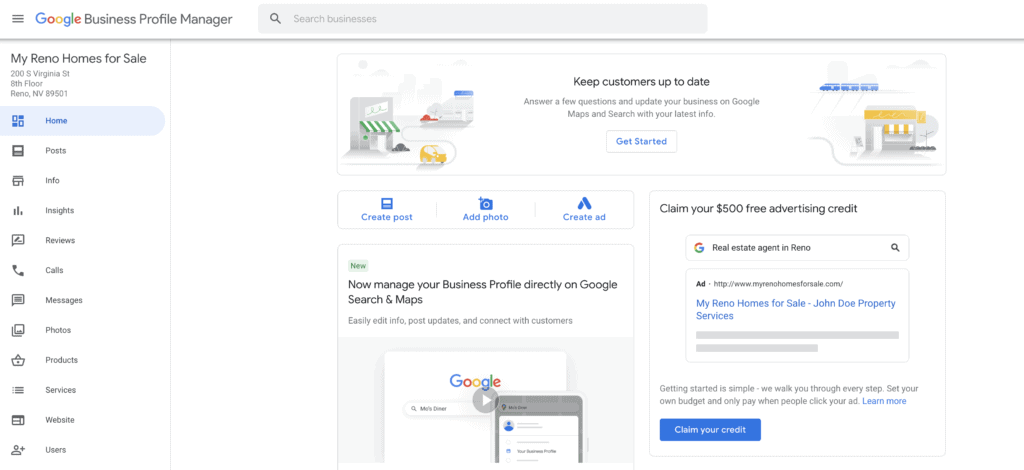
Go to: business.google.com (It’ll look similar to the illustration below.)
Step 2:
Navigate through each of the tabs on the left side and become familiar with them. You can also begin to add the necessary info in each tab where you’re able to. These are the tabs you’ll see: Home, Posts*, Info, Insights*, Reviews*, Messages*, Photos, Products*, Services, Website, and Users. Take note: The tabs that have an asterisk * next to the above means that you will be limited on what you can do in those tabs until your account is verified.
Step 3:
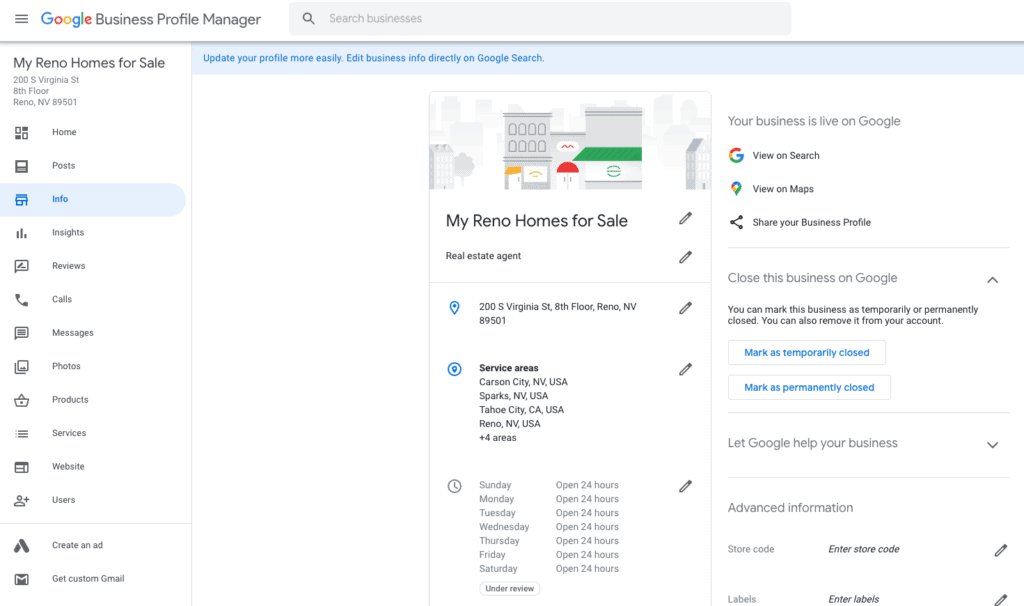
The Info tab is perhaps where you’ll spend most of your time should you tackle this project on your own.
Business Location: The first part in the Info tab is your business location. Depending on your local real estate regulations and guidelines, this will help you determine if you should use your home address or work address. (Please ask your brokerage for guidance on this matter.) If you choose to use your home address…do you really want the general public to know where you live, even if you work remotely at home?
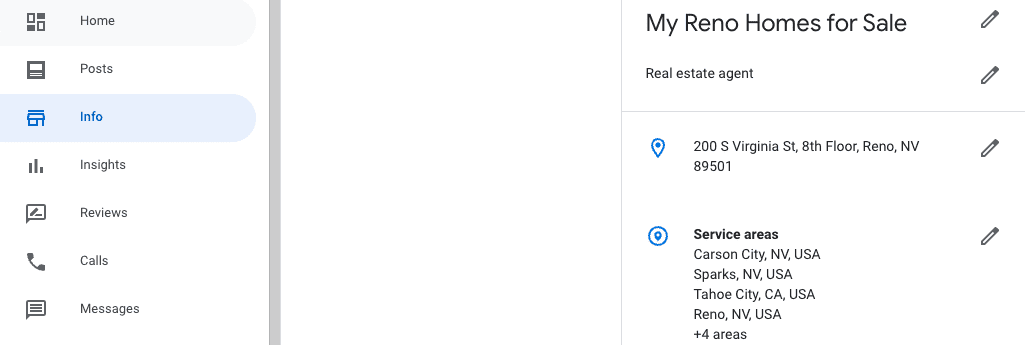
It’s probably not the safest option either, and again, it may not be within your local guidelines, so it’s something to consider. If you work for a brokerage and don’t have your own office address, you can either add your brokerage address, or clear your address as we illustrated above, and move on to the next section which is your Service areas.
Google Business Location Requirements: Even when your business doesn’t want to display an address in the listing, Google requires a mailing address for the business. While in the Info tab, click the Address section, and in the window that appears, scroll down and simply select the box next to the “I deliver goods and services to my customers at their locations” option, and your business will have a listing without an address.
Virtual business addresses are allowed and can be registered for a Google Business Profile without violating any rules. In fact, a virtual business address often provides more legitimacy than just listing your home address online without going through the appropriate steps to register with Google Business. If you’d like more information about this, let us know in the comments below and we can further assist.
Yes, do the following:
Step 1: Log in to Your Profile
Step 2: Click the “Info” Tab
Step 3: Click the Pencil “Edit” button (next to your location address)
Step 4: Select “Clear Address”
Step 5: Click “Apply”
Step 6: Confirm that your address was removed
Verification! If you’re noticing you don’t have access to some of the tab information and editing, it’s more than likely because your business has yet to be verified. Be sure to go through this process by clicking on any of the verification links that Google provides in your account in multiple areas. Once you take those steps, Google will send you a postcard with a pin # on it.
This pin will be used inside your account to verify that it’s you/your business at that location. Again, you’ll be a little limited on some of the options during setting up your profile until verification is approved. Any edits after you save your listing will also not appear until you’re verified. Be aware, the verification postcard is exactly that, a postcard, and it’s rather unassuming and very easy to get lost in “junk mail” and such.
Service Areas:
The next section to focus on in the Info tab are the main areas/locations you service and sell real estate? This is extremely important and is also where Googling: “Realtors in Reno” or “Realtors near me” will populate those who have their GMB properly set up and fully complete, as well as a few additional things they’re doing to get them on top (that we can assist with).
Hours of Operation:
This is your own choice if you want to be available 24 hours or during certain days and times unless, of course, you have an office location that does have specific hours of operation. These times and days can also be changed and edited at any time. Something to consider if you’re virtual or focus more on a service area rather than an address location is if you choose to not be open “24 hours.”
Prospects will potentially move on to the next agent if they’re viewing your GMB listing after hours and they’re ready to get the information and resources they’re looking for.
Phone Number:
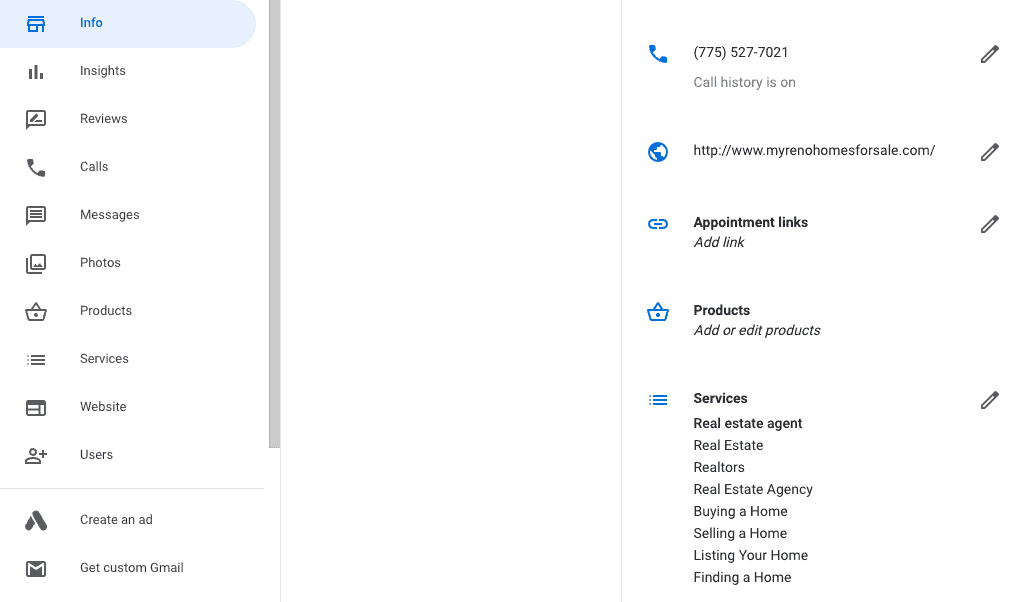
Simply add in your phone number and turn your call history on. This also allows you to track the calls you’ll be receiving from your GBP.
Website:
If you don’t have a website, then Mail-Right can help you with this too with one of our plans you can find here that are specifically for real estate agents and brokers. Mail-Right’s websites will provide you with the SEO you’re wanting and needing, and complement your business on Google and other search engines.
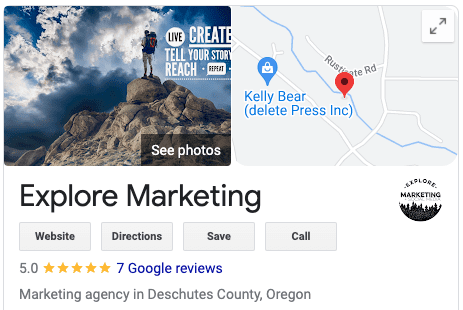
This is also a crucial area to focus on. Add in the services that you provide as a real estate agent such as Real Estate Agency, Real Estate, Realtors, Finding a Home, Listing Your Home, Selling Your Home, Buying a Home as some examples.
From the business:
You can add attributes to make your profile even more relevant. For example, you could choose “Identifies as women-owned” and add “Online appointments” to your service options.
The bottom section of the Info tab and the From the business area is the description of your business. This does show up on the Google searches under your business listing, so if you scroll down under your listing, you’ll see this description. Be sure to use search terms and keywords in this in an organic way to maximize the SEO, or we can do it for you with one of our plans. You can add up to 750 characters in this description.
Moving on from the Info tab is the Reviews tab. As you probably know, these are the testimonials and recommendations from your clients. People check Google reviews – this is a fact! In fact, over 80% of people trust an online review as much as a personal recommendation. In addition, the more reviews you have, the better ranking you’ll receive from Google. You’ll also get to a point where you will populate in searches higher than your competition because of the reviews you’re receiving. Be sure you’re replying to your reply to your reviews in a timely manner.
Use cordial communication, thank them for their input, and especially for the good reviews, be direct, use keywords, and continually use “…best Realtor in ______” (add the area you service) in your replies so that adds Google juice to the search algorithms. “I’m humbled by the fact that you say I am the best Realtor in Reno…” for instance.
What about bad reviews?!? Google likes when you’re directly on the replies and that you give the person the opportunity to reach out to you so you can find out more about the situation and see if you can grow from this experience and improve in any way. Thank them for the feedback, and maybe a few details about the possible reasons they maybe had a less than exceptional experience. You can also ask some friends to honestly add reviews after the bad review to counter it. There are always legitimate reasons why you may have not met the person leaving the review’s expectations.
You may not have been willing to overprice their home, or maybe they put you in an uncomfortable situation. As best you can, share this so when people read through the reviews, they’ll see your response. Most of the time, you’ll probably find that there are very few replies back to the responses you give to your reviews, whether good or bad reviews.
Compile your reviews, testimonials, and recommendations in a document or form that you can then also bring to your listing appointments. You can organize them based on what you know about the prospect. If pricing is important or a timely sale, but those reviews upfront so they can glance at them and it’ll relate. After your listing appointment, you can leave them a little gift, let them know their home is beautiful and that they’ll be making their neighbors proud by having you sell their home for them…then include those reviews that you have saved in a document form.
Also, you want to take advantage of your happy customers at closing, and ask if they are open to you sending them a few simple links that help you grow your business. Let them know that you’d like to also share their testimonial with other people so you can help more people as you did for them. Then, follow up with an email and/or text to your happy clients on closing day with those Google, Facebook, and Zillow Review links to make it easy and convenient for them. Make sure they know it’ll only take a couple of minutes and help you a lot!
Include the closing disclosure/settlement statement since they’ll need it for their taxes. You can always give them a few ideas on what they can share, but really…what made this a successful and pleasing transaction? What simple details can they add to it that they loved about working with you? Take Note: You don’t want every review to have the same type of copy on it, so be careful about this because Google is looking for genuineness with these reviews, so duplicate review text will possibly trigger some negative juice to their algorithms.
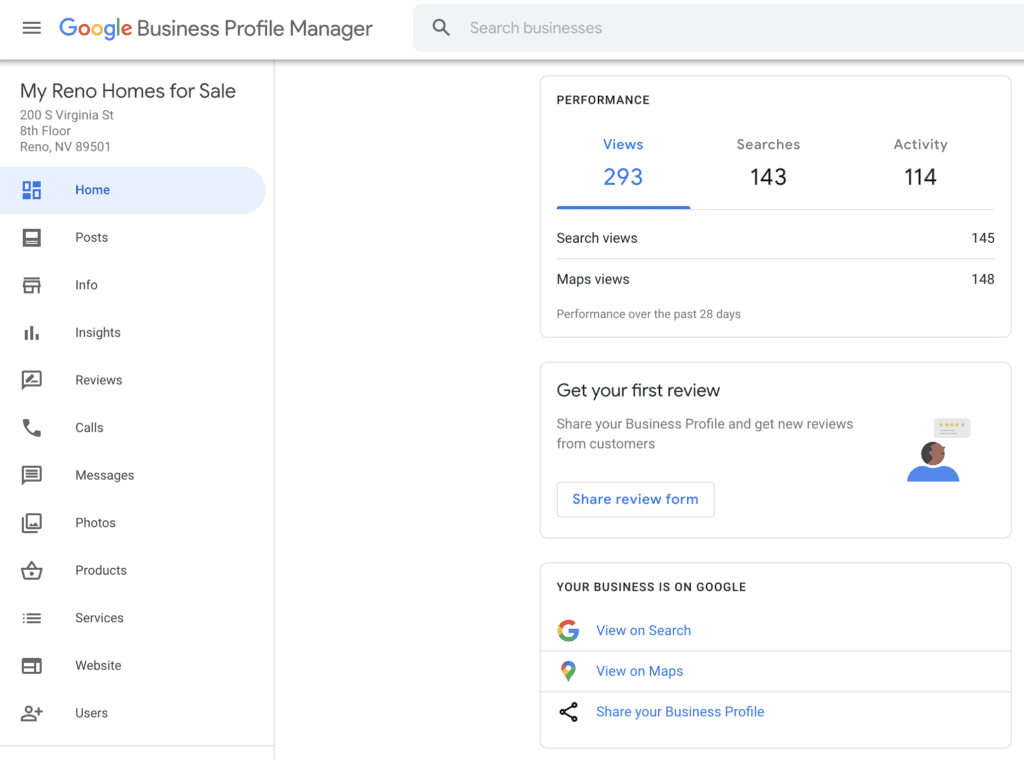
Reviews Pro Tip: Google Business has a link for you in your account that you can use in your emails and texts with your clients. If you go to your Home tab, scroll down and you’ll find it under the Performance section if it’s your first time using it and you don’t have any reviews yet, the section will say: “Get your first review” and you’ll click on the “Share review form.”
Photos:
Photos are a really important factor in your business account. You’ll want to try and add at least 100 high-quality photos and even videos, that will market you positively. Photos are proven to drive more customers, and Google says that people are 42% more likely to request driving directions to a business if its Business Profile has photos, and 35% more likely to go to its website. Don’t be afraid to use the Google Business app on your phone or mobile device…it’s convenient, accessible, and makes life easier for you and your marketing! Don’t have 100 photos to add? It’s OK to build this up over time. You can also take photos/screenshots from your other sites that you have reviews on and add those to your GBP listing, such as your happy clients at closing or in front of their new home, new listings in the area that you have permission to share, parks, trails, outdoor recreation areas and the like. What are things, people?
In this post we have tried to give a clear and simple road-map connected to how you setup your “Google Business Profile” and also give you some insights on whay its so important to spend time and engery on this if you a real estate agent professional. One of the great things about this is that Google is offering all this power and free promostion to you for free also by seting your Google Business Profile the correct way you be of about 10% of agents that claimed and spent any time connected to setting up and configuring their Google Business Profile. Also it the fundemental first step you need to do if you plan to use the power of Google Local Service Adverts which in our option one of the most powerful and affordable ways you can get quality local leads at the present moment that really turn into commision checks!

Social media has become a handy and low-cost marketing tool. It is on these platforms that a company can find Read more

All real estate professionals share a mutual goal: to get and convert more leads, thus, grow their real estate business. Read more

Here are seven killer tips that you can use to create high-converting real estate Facebook ads Real estate agents know Read more

LinkedIn is a very important part of social media marketing. So how can you stand out from the crowd as Read more

If you’re wanting to be successful in 2022 with your real estate business, then one can’t deny that social media needs to be at the top of your list, and for multiple reasons. Now, we know from experience that there are agents all over the spectrum with this. Some of you have absolutely accepted the fact that social media is here to stay and it is in fact, already producing leads with the effort you’re putting into it.
Others perhaps, realize that it’s a “necessary evil” in order to stay in business, but aren’t certain what steps to take, and are maybe overwhelmed. And we’ll leave out another group that very few can relate to who have been doing real estate for decades, and they just don’t care about social media because they have such a large network of die-hard clients, and they’re looking to retire soon anyway (and then you can capitalize on obtaining their clients with your awesome social media marketing and branding skills).
So are you ready AND wanting to maximize your real estate brand on social media this year? If yes, then you’re in the right place because we’re going to give you five quick tips that you can start to immediately put to use, which we also hopefully inspire you to take the next steps on a successful real estate adventure.

#1 Brand Yourself
Social media is more than just about you…but it’s important to remember that you are the brand! It’s like that saying: “Your smile is your logo, your personality is your business card, how you leave others after an experience with you is your trademark.” Branding is crucial to your local market. To clarify, branding is the “why” people hire you, while “marketing” is the vehicle or tool that’s going to help you distribute your story and brand to them. Possibly contrary to today’s real estate logic, you need to find a niche (we also discussed this in our other video Five Best Real Estate Marketing Videos and Tips for 2022 if you want additional details).
The more focused you are, the more you’ll be able to connect to people, the easier it will be to integrate it into your social media, and the more leads you can generally generate. To give you some ideas on what you can create a niche for, here are a few to consider: Geographic areas, neighborhoods, certain types of clients or demographics, different types and/or styles of homes (luxury, ranch and land, condos, farms, townhomes, single-family, barndominiums…and/or Craftsman, Colonial, Cape Cod, Victorian…you get the point).

#2 Choose Your Social Media Platforms
One of our philosophies at Mail-Right is: “Do a few things and do them well.” You can be a jack of all trades, master of none, or a jack of few trades, master of one. We’d prefer that you get good at 1-3 social media platforms, versus trying to take on doing 7 different social media platforms and sucking at all of them. Select a couple of them, and then put your attention on those, trying to master one of them. Once you master one of them, move on to focusing on the next, conquer it, and so on. Before you know it, you’ll get really good at 2-3 platforms, and you’ll notice the return on your investment increasing!
When people ask us which platform they should start with, we simply encourage you to start with what you’re already on and familiar with. For most, this would be Facebook or Instagram. Both are owned by Facebook, and both basically have every generation on them for the most part (that are purchasing homes anyway). The third platform one must consider is YouTube. The other reason we suggest these three is because you can repurpose your content and copy on them rather easily. We’ll go more in-depth about these in #4, so keep reading. One last thing, be sure to familiarize yourself with the technology and tools that are available to you from these platforms. You can do a lot nowadays with the free apps they provide, as well as their desktop tools, so take advantage of them.

#3 Social Media Needs to be About YOU
Before we get ahead of ourselves, you need to know that there is a fine line between making it ALL about you, and having your branding and social media represent you and who you are. Remember that it’s called “social” media for a reason, so give people a backstage pass to what your life is like as a Realtor®. You cannot afford to be an invisible agent if you want to be a successful real estate agent. Plus, people want to know what it’s like to be you, what you do, what it takes to juggle your busy schedule, where you hike and go on walks, books you’re reading and why, houses and features in houses that you love, if you have kids or are married or have a dog, how you overcome the challenges…you get the point
Also, don’t forget that you need to make your clients and prospects the heroes in your story. We’re currently seeing a lot of the same posts from agents on social media that are a single, static image of all the homes they’ve sold this past year…and wow…what a missed opportunity! Who’s the heroin that? Besides no one being able to see what those houses actually look like because it’s so small, nor if they’re really that real estate agent’s homes they sold; what if instead, you made a quick, little video with the homes and the happy clients of those homes…do you see the difference here? This is what we call a “two-for” because you’re branding yourself, but also highlighting your happy clients
! A little more strategic and intentional effort can go a long way. A static image with 50 homes on it will not connect to a consumer’s emotions like a home that pans to its happy clients…can you feel that difference even just reading this? Imagine if you have multiple shots of homes and happy clients that you can include in this video that’s even more impacting! In addition, the algorithmic weight that you’ll be putting out there will be much greater, you’ll be connecting to people on a much deeper level as they see and hear your happy clients laughing and smiling, and you will in turn also reach more people, get more engagement, and increase your SEO. Does this sound like a good return on your investment?

#4 Know About the Different Social Media Platforms
We previously mentioned three of these platforms that you can focus on (Facebook, Instagram, and YouTube), mostly because you’re already on them. But know this about social media: It’s a pay-to-play game now for the most part. Organic reach is next to nothing on most platforms, usually between only 1-7% at best research shows. And if you have the average number of followers (300-500 depending on the platform), then that’s a “whopping” 25 people you might be reaching with all that hard work you put into creating a video post or Story.
So what’s the solution? How can you strategically use one or more of these to market your real estate business? One important factor is to understand if the platform is aimed at short-form or long-form videos. Short-form can be 15-60 second videos for Stories and Reels for instance. Long-form videos would be more for YouTube, and even Facebook allows these. Once you know the difference between short and long-form, you can create your videos specifically for that platform, then repurpose it for the other platforms (we also discussed this in our other video Five Best Real Estate Marketing Videos and Tips for 2022 as ”batching,” if you’d like to learn more). Which platform are you going to focus on and master? The easy answer for most is again, the one you’re most familiar with. Here are a few highlights for each:

#5 Be Prepared
It’s been said (and we agree), that if you fail to plan then you plan to fail. Don’t fall into this rut. If you’re ready for the challenge, then create yourself a basic social media calendar and content library or folder system. If this is too overwhelming (we know it is for most, or you don’t have the funds to hire someone to do your social media management), then consider the Mail-Right program which does this and more, but isn’t overwhelming. Here are a few more tips that will help you amplify your branding and marketing with your social media:
When it comes to being successful in real estate this year, then implementing these five crucial tips will help you maximize your branding and marketing efforts, so you can generate real leads and get the return on your investment. Remember to brand yourself, know which social media platforms you want to master and get good at, and balance out making it about you (but also make your clients and prospects the heroes in your story). Integrate those short and long-form videos on the appropriate platforms you’re working on, and be prepared by integrating the above information. We’d love to hear what you think and if you have any questions. Which area is the most difficult for you? Which do you think you can accomplish? Lastly, let us know if you’d like to schedule an appointment so we can walk you through a demo of our Mail-Right program if you’re needing help with the above too, and are ready to step up your real estate game.
Social media has become a handy and low-cost marketing tool. It is on these platforms that a company can find Read more
All real estate professionals share a mutual goal: to get and convert more leads, thus, grow their real estate business. Read more
Here are seven killer tips that you can use to create high-converting real estate Facebook ads Real estate agents know Read more
LinkedIn is a very important part of social media marketing. So how can you stand out from the crowd as Read more
When it comes to real estate, videos, and social media, there is perhaps a no better nor powerful way to grow your business. It’s a proven and effective way to generate leads, build SEO (Search Engine Optimization), connect with your audience, and get your branding out there above your competition. Knowing this is the case, then why aren’t more Realtors® doing it? There are several reasons why that we’ll discuss as we highlight five of the best real estate video marketing videos and tips that you can practically put to use immediately!

You need to become the digital mayor so to speak of your community! Share about events, important people (not politics), and consistently share about what’s going on in your area. Be the expert in your community. What’s the lifestyle like where you live? Why do people live there or move there?
For instance, if it’s an outdoor recreation mecca, and there are mountains and people ski, snowboard and hike, or lakes and rivers that people fish, kayak, and paddleboard on, then show people these things so you can show them that you are the authority. Are there dog parks and off-leash dog parks, trails, mountain biking, shopping, concerts, and entertainment, or sports games that you can let people know about? You being the source of this information increases your exposure because you’re being micro-focused, and this is good for your area and will increase your SEO. You will also be able to repurpose this content on your other social media platforms like Facebook and Instagram for instance, as well as your website

People are fascinated by homes and real estate. In fact, most of us just love homes, other local houses in the neighborhood, homes we’d like to buy or wish we can buy, luxury homes, ranches, and the like. This is why it’s vitally important that you learn to utilize your video home tours and create content that’s not just a selling tool, but also to show off the area, as well as the different kinds of homes in the area, so you become the resource. Doing this will build your brand and show consumers that you’re the local leader in real estate where you live. Take Note: We do not mean using photo slideshows since these will not produce the same results that an actual video will. Consider yourself a mini-HGTV that the public likes because of what you’re showing them on your social media as the digital mayor.
Remember that you get what you pay for when it comes to videos, and the higher quality content will generally get you better reach. We’ll get into this more in another video, but some basic examples you want to consider are if your footage is shaky vs. using a selfie-stick, or even better, a gimbal, so it’s clean and smooth. Again, this makes a difference in the quality, and people will notice and even engage more with your posts when you spend the extra time to do it right. This doesn’t mean you always need to have a professional do your videos, but make sure at the very least that you’re having a professional do a video of your listings.
You can also highlight different styles and eras of homes, or kitchens, bathrooms, backyards, curb appeal, and other things that stand out to people, and it also gives them ideas and satisfies their desires. Did you know that you also have a pretty impressive video camera in your pocket or purse? Utilize that and make sure you’re recording at 1080p minimum, but many now have the capability of recording in 4k quality too which is amazing! At this point, it’s common knowledge that video outperforms static images (photos) on almost every channel out there, so use this to your advantage! Pro Tip: If you’re running low on your own listings, don’t forget that you can share about other agents’ listings, especially the agents in your office, just be sure to get permission first! Some of the most reached posts are homes that are reshared by others.

What questions do buyers, sellers, and prospective clients always ask you? You know what we’re talking about here. Make a list of all of these questions and find a niche that you can specialize in. “Nichify” is the area you live in, whether it’s a country area, metropolis, or urban area because this will help you connect to that audience in your city, town, or region. When you educate people and answer questions they’re asking, this proves you are the experienced one that can walk them through one of the biggest financial transactions most people will ever make in their life!

What if you created a 5-minute video that answers 10 questions that you posted on YouTube, and then repurposed the content and made ten 30-60 second videos that do the same thing and answer the same questions? Then you have 11 videos from 1 video. This is often called “batching” because you’re able to spend time focusing on one dedicated session to get these 11 videos done because it’s fresh in mind, and those creative juices are flowing, so take advantage and be strategic with this. This will also save you time and allow you to be more impactful, effective, and efficient.
Also, don’t underestimate the power of pulling out your phone and capturing a quick video (min-edits we call them) of the location you are in if you’re on a mountain bike ride or a hike or just out and about for instance. Capture nature, mountains, rainbows, lakes, shopping centers, venues, and local businesses as some ideas. It doesn’t take much and try not to overcomplicate the process. Try to get what you can in 60 seconds or fewer clips, that you can then repurpose and trim down to 15 seconds. We like to use “KISSS” with our social media and videos (Keep It Simple, Short not Shallow).
(AKA Email Drip Videos)

Not only can you post these videos you’re producing on different social media platforms, but you can then also post them to your website as a blog. Then you can include them in the monthly emails that you send out to your clients and prospects (which you then drive traffic back to your blog). So utilize programs like BomBom, Zoom, Mailer-Lite, or our own Mail-Right program that we’d love to get you familiar with and give you a tour of. With these outreach videos, you can create a personalized presentation about a prospect’s home or someone in your database, and you can send them an email (or text) about their home, its value, and other useful information about their property that would help them.
Then you can let them know if they have any questions, they can contact you. This positions yourself in a way that is not “sales” and shows that you are proactive and the resource for real estate for them. Sure you can send a photo, but a video can tell a story in a text or email in such a way that you can express emotions and connect at a much deeper level. You’re also showing these prospective clients that you go to extra lengths to market your business that will carry over into selling their home for instance. When you use programs like Mailer-Lite, it can also show you who opens it and for how long, and other features that can be helpful to your marketing efforts. If your brokerage offers a CRM (Customer Relationship Management), and it’s been proven effective, take the time to learn it so you can use it to implement and integrate the above-mentioned features and tips.
We hope this has inspired you to take the next steps on your video marketing journey so you can experience new growth with your business and relationships in your community. All five of these real estate video marketing tips you’re able to implement immediately, and as you consistently apply them into your marketing plan, you’ll see your pipeline grow, your following increase, your rankings on search engines rise, and the satisfaction of seeing the fruit of your labor. Do any of the five tips resonate? Need help with any of them, or have questions we can help with? Any of the tips you just tend to struggle with? Simply let us know in the comments.
Social media has become a handy and low-cost marketing tool. It is on these platforms that a company can find Read more
All real estate professionals share a mutual goal: to get and convert more leads, thus, grow their real estate business. Read more
Here are seven killer tips that you can use to create high-converting real estate Facebook ads Real estate agents know Read more
LinkedIn is a very important part of social media marketing. So how can you stand out from the crowd as Read more

In today’s world, specifically the real estate industry, blogging is still incredibly powerful! It’s a solid way to generate leads, build Search Engine Optimization (SEO), and is also a great way to compete with the likes of Zillow, Trulia and Realtor.com. Digital marketing geeks like us at Mail-Right, are all about finding ways to optimize search engines and get placed higher, and blogging is no exception to this. One of the questions we often get about best real estate marketing results is guidance on where to blog and where to start. It’s true, there are so many options out there in the online world that we live in, that it can be mind boggling! So let us narrow it down for you by comparing WordPress (WP) and ActiveRain (AR), so you can decide for yourselves. We should also let you know that we use WP for our CRM website and blogs, but we’re not coming from a point of being biased, but experience since we have also used AR.
Let’s dive a little deeper into it with ActiveRain. AR is a real estate blogging platform that has more than 300,000 members. It’s the largest, most active social network in the real estate industry (https://activerain.com/about), that’s a community of people who are brokers, agents, home stagers, mortgage brokers and lenders, inspectors, appraisers and the like. It also has SEO structured content and the ability to post your blog on a website that has extremely high domain authority (DA). DA is a search engine ranking score developed by Moz that predicts how likely a website is to rank in search engine result pages (SERPs). (https://moz.com/learn/seo/domain-authority) Domain Authority scores range from 1 to 100, with higher scores corresponding to greater likelihood of ranking. So it’s very important to have this as part of the deal because it helps your blogs rank higher than the average website blog.

ActiveRain also has over 400 million blog posts specific to real estate. You can expect to learn about best practices, other’s success and failures, and also find high quality training through the Active Rain University. But know this: It’s not only about blogging, it’s really about a community, and community means relationships and a national referral network of like-minded people. You just might find life-long friends along the way. AR is also a place the consumer can seek out real estate knowledge too.
The main reason people love ActiveRain is because you can blog about anything! The platforms outside blog posts are for consumers and SEO. Likewise, you’re also able to blog to other agents and industry professionals. You can share ideas and information, and the comments part of ActiveRain is effective with its two-way communication. AR is also good for posting real estate listings. These posts tend to do well with SEO and they don’t gum up the consumer facing sites with homes they may or may not be interested in checking out. On those sites, we would write about houses in that price range or style, and share a link to those types of homes where the listing is included in the list.

Now let’s look a little more in depth at WordPress: As a CMS initially designed for blogging, it’s grown leaps and bounds from there (if you’ve been around the past decade or so, and you’re familiar with websites and blogging to some degree, you’ll know what we mean). WP is an advanced blogging tool that provides a rich set of features. Through its Administration Screen, you can set options for the behavior and presentation of your weblog. WP goes to great lengths to see that your blog posts look good, the text is beautiful, and the html code it generates conforms to web standards. In addition, over half of the top 1 million websites use WordPress. Many established real estate website providers build their sites on WordPress, and all the good IDX companies build WP compatible plugins. (See how it gets a little more techy than the ActiveRain option?

When it comes to ActiveRain, this is a great option for the newer blogger, not only because it’s powerful, but it also includes a point system that holds people accountable and helps you gauge your blogging efforts. There also happens to be other realtors on there, so you can view what they’re doing and glean from them!
WordPress on the other hand is our method for niche blogging. We’ll create a specific blog that’s geared for SEO in a particular area that we’re looking at targeting. For example, you can do a Reno, Nevada Real Estate Update blog that’s aimed toward home sellers, and then a Reno, Nevada House Hunter blog that caters to home buyers. These typically place well in search engines and literally drive traffic back to our main site.
In short, both WordPress and ActiveRain are very effective ways to blog, and both have their strengths and weaknesses. It really comes down to your experience with websites, your end goal, and how simple or in-depth you want to go with your blogging. WordPress tends to be more than a beginners blogging option, and is somewhat better for those who have some technical background in them…or you should at least be willing to go through some training to learn it. Don’t think that you also need to be limited to only one blogging platform either since both have their strong purposes. And in doing so, you can also link each of the sites together for SEO purposes.
Now that you have a better understanding about both WordPress and ActiveRain blogging websites, which do you, or would you choose? Let us know in the comments, we’d love to hear what you’ve experienced.
Social media has become a handy and low-cost marketing tool. It is on these platforms that a company can find Read more
All real estate professionals share a mutual goal: to get and convert more leads, thus, grow their real estate business. Read more
Here are seven killer tips that you can use to create high-converting real estate Facebook ads Real estate agents know Read more
LinkedIn is a very important part of social media marketing. So how can you stand out from the crowd as Read more
LinkedIn is a very important part of social media marketing. So how can you stand out from the crowd as an influential leader within your industry, and still reach your intended audience? In order to maximize some of the benefits of the platform, we need to build a foundation and understand how it works, what results in better engagement, and how you can use some of the tools and options to maximize your impact. Keep in mind that we can spend hours and probably have 100 tips that could help, so we’re going to start with the five we tend to get the most questions about.
Post often and consistently, but don’t overdo it
Putting in a process in place of when and how often you post may seem like a basic step, but it’s where you should start from. There has been enough research that confirms that there is more engagement with an influencer that posts 30 times a month versus 50+ times a month. So what does this mean? The recommendation is to post enough that you can be consistent with, but not too much. If you’re able to post 3-4 times per week, but 5-7 times a week is too overwhelming, then stick with what you can commit to. In addition, limit your monthly posts to no more than 30 in order to take advantage of maximizing your engagement. Don’t forget, when you post is also extremely important on social platforms. For instance, typically on LinkedIn, it’s best to post in the mornings and late afternoons, but always be sure to look at your analytics
and experiment so you know what’s best for your audience and according to your and their timezone.
Pro Tip: Do a few things and do them well. Why set goals up for yourself that will either burn you out or disappoint you for not achieving them
Share videos and visually appealing content
Did you know that posts with images get almost 95% more views than those without? This isn’t limited to images alone, you can and should also add videos (even animated text or moving images zooming in or out are also helpful and considered “video”). Apps such as Adobe Spark Post and Canva can be very helpful for these additions and quick editing of words and images to create simple videos. If you’re not comfortable with videos yet or not able to for whatever reason, then add images in a series called a carousel that your viewers can swipe through.
Pro Tip: We typically have only 7 seconds to keep a person’s attention, so make your content and imagery/videos with a “wow factor,” so people will stop the scroll and pay attention to the story you’re telling.

Keep people on the social media platform
Many don’t realize that when you take someone off of a specific platform from your post, you’re doing something the social media channels do not prefer. For instance, you post an image, then tell people to check out a YouTube link so people click and are no longer on LinkedIn. Why would LinkedIn like for you to take people off of their platform? It’s like a real estate agent who’s selling a home, and he/she tells a prospective buyer to go check out another real estate agent’s listing to purchase instead, thinking they’re growing their business. It just doesn’t make sense, right? So be sure to upload your content directly to LinkedIn whenever possible, and keep people on the specific platform you’re posting to as much as possible so you can increase your reach.
Pro Tip: How can you create similar content that would cause someone to click and leave the platform and check it out (as described above), to stay on your post and inside the social media channel, and interact with you?
Share others content too
Have you ever heard of the Pareto Principle? Many know it as the “80/20 Rule,” but the main point of this principle is that 80% of consequences come from 20% of the causes. It’s like the saying: “80% of the work gets done by 20% of the people.” The rule is not limited to 80/20, but can be 90/10, 60/40, or the like; and it all depends on the circumstances. Have variety in your posts, and don’t only share your own content, but also share what others who are respected and have followers and exceptional engagement are doing. Find some influencers on LinkedIn (some who are in your industry, and some who are not), and properly share their articles and posts. Also, be aware of what these other top real estate agents and trainers are sharing. Then share some of what they’re doing, and also get ideas from them on what you can now produce and post on your own without copying. The algorithms know when you have a variety of content when people are engaging when you’re sharing others’ posts and articles when you’re commenting and replying to your own and others’ posts and messages…and when you are not. Putting effort into making the experience on their platform more enjoyable will increase your chances to get more reach.
Pro Tip: Ask yourself: “Is my post-self-serving, or does it bring value to my followers and prospects?” And don’t forget to tag the person whose content you’re resharing; you may be surprised at the interaction you could bring to yourself.

Who’s the superhero in your content?
Most don’t realize it, but what they share is usually all about themselves. There’s a time and place for this, but how does this make the consumer and prospects feel when they see your content? If you’re only sharing your real estate listings, then stop. What are some of the best parks in the area you can help people know about who are looking to move to the area? Where are the off-leash dog parks? What events are coming up that would benefit someone to know about? When you make your audience the hero, you actually then become their hero for helping them. Some may need to reprogram the way they’ve been doing things to better reflect this in the story they’re telling online and on social media.
Pro Tip: Don’t forget the 80/20 Rule.

LinkedIn is a social media platform that continues to grow and be used by more and more people and influencers, and it’s not “just a professional network for job searches.” This is an opportunity for you to bring some positive content into a world that needs it right now when there is so much uncertainty. Take advantage of these tips and hacks, and influence those around you by what and how you’re sharing, how often, and when. Remember to not overwhelm yourself, but do a few things and do them well. Also, be ready for new opportunities to open up for you as you intentionally interact with people and not just push information out there without engaging. If you’re not getting any likes or followers, there’s a reason. If you practice these 5 LinkedIn tips, we’re certain things will start to turn around for you. Maximize your potential on LinkedIn (and other social media channels) by putting these steps into place.
Social media has become a handy and low-cost marketing tool. It is on these platforms that a company can find Read more
All real estate professionals share a mutual goal: to get and convert more leads, thus, grow their real estate business. Read more
Here are seven killer tips that you can use to create high-converting real estate Facebook ads Real estate agents know Read more

Blogging: WordPress vs. Active Rain In today’s world, specifically the real estate industry, blogging is still incredibly powerful! It’s a Read more